Embedding a feed on your website
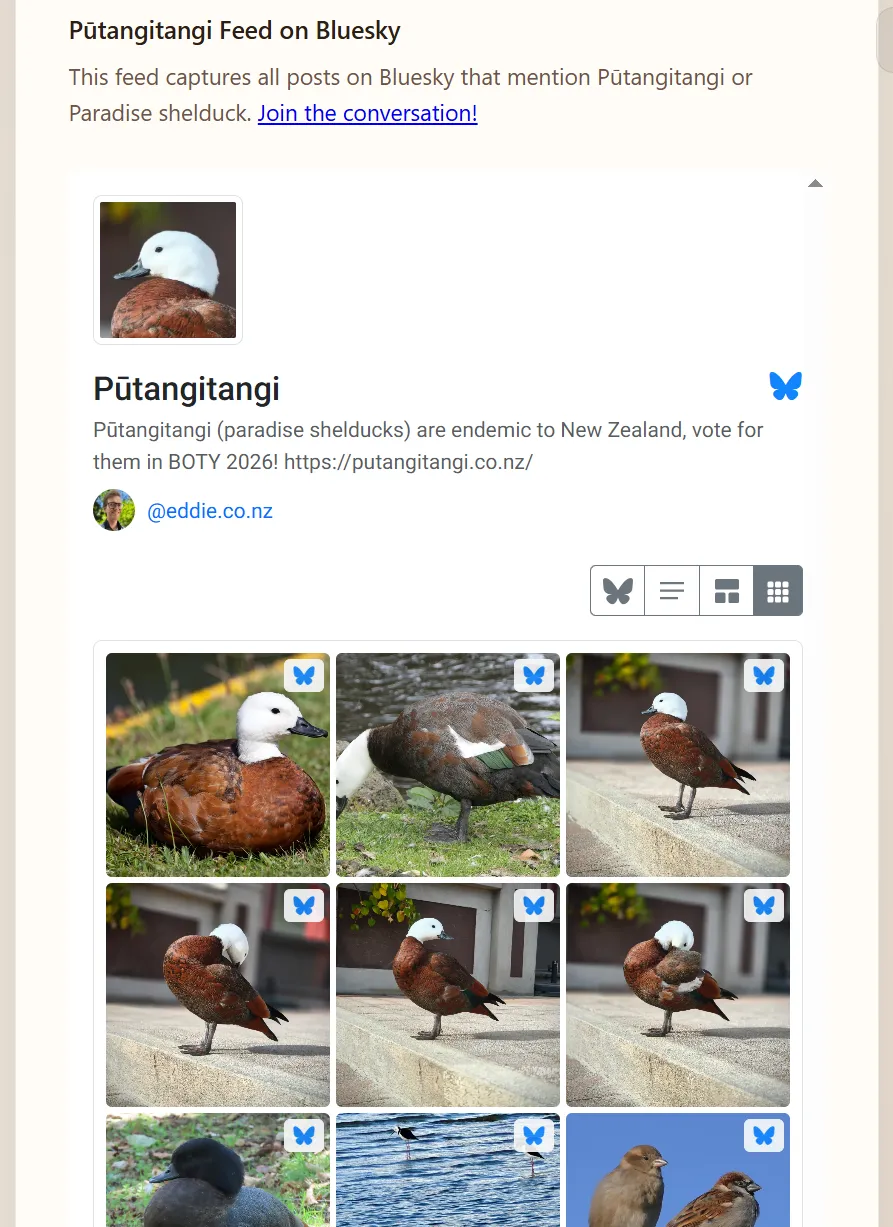
You can show your feed inside any normal web page using a small HTML snippet. Bluesky Feed Creator serves a responsive viewer in an iframe: visitors can scroll posts, switch layout, and (unless you turn it off) search within the embed.
To see a working example, visit https://putangitangi.co.nz.
Getting the code
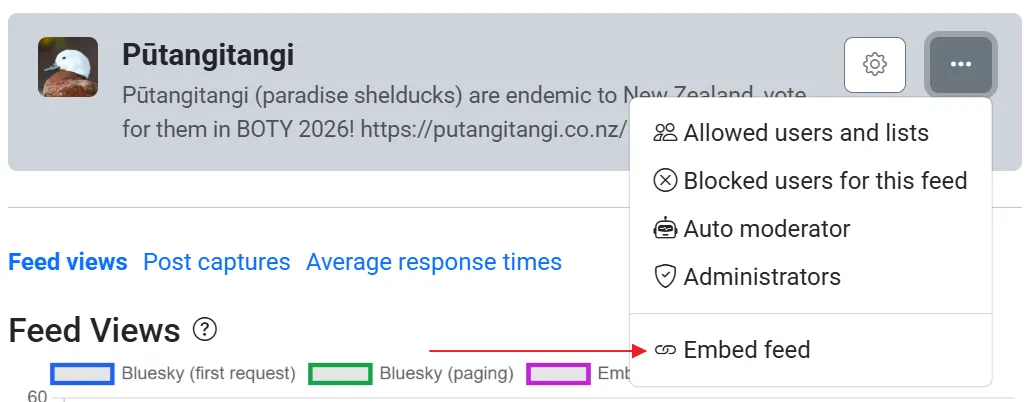
Section titled “Getting the code”For a feed you host on Bluesky Feed Creator, open the feed in the dashboard and use the actions menu: choose Embed feed. For a published collection, open the collection editor and use Embed feed there as well.
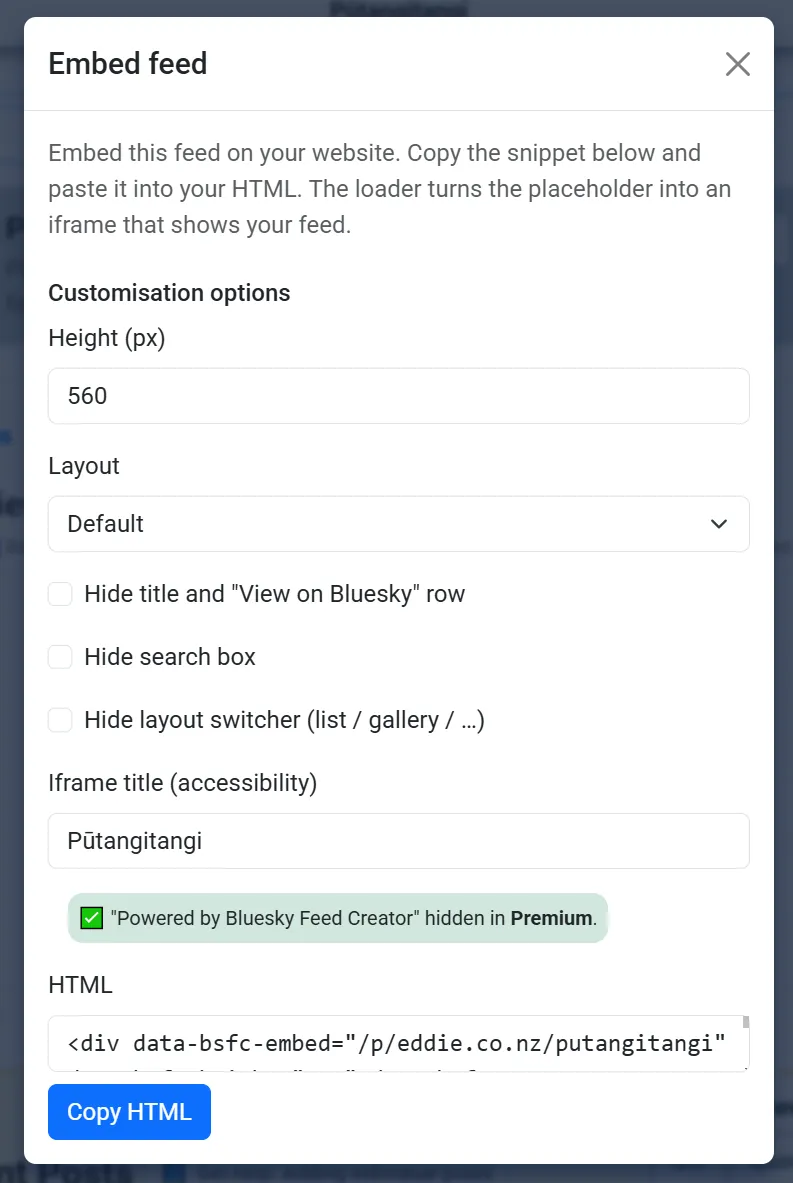
A dialog opens with Customisation options and a HTML box. Adjust the options, then press Copy HTML and paste the result into your site’s HTML (for example in a CMS “custom HTML” block or a template).
The snippet is always two parts:
- A single empty
<div>withdata-bsfc-*attributes that identify your feed and the options you picked. - A
<script>tag that loadsbsfc-embed.jsfrom BlueskyFeedCreator.com. When the page loads, the script replaces that<div>with an iframe pointing at the embed viewer.
You only need one copy of the script per page, even if you add several embeds (each still needs its own <div>).
Options you can set in the dialog
Section titled “Options you can set in the dialog”These match the data-bsfc-* attributes on the placeholder <div>:
| Option | What it does |
|---|---|
| Height (px) | Minimum height of the iframe before the viewer grows with the content (default 560). |
| Layout | Starting layout: default, list, compact, gallery, or scrapbook. |
| Hide title and “View on Bluesky” row | Hides the top chrome so only the post list shows. |
| Hide search box | Turns off in-embed search. |
| Hide layout switcher | Hides the control that lets visitors change list / gallery / etc. |
| Iframe title | Accessible name for the iframe (screen readers). You can keep your feed title or shorten it. |
Feeds you host on Bluesky Feed Creator
Section titled “Feeds you host on Bluesky Feed Creator”The placeholder uses your public page path, for example:
data-bsfc-embed="/p/yourhandle/your-feed-path"
That path is the same as your feed’s public description URL on this site, without /embed on the end (the loader adds that for the iframe).
Any Bluesky custom feed or list (AT URI)
Section titled “Any Bluesky custom feed or list (AT URI)”The same loader supports AT Protocol URIs for a custom feed generator or a list, for example:
data-bsfc-embed="at://did:plc:…/app.bsky.feed.generator/your-feed"
or
data-bsfc-embed="at://did:plc:…/app.bsky.graph.list/your-list"
Posts are loaded through the Bluesky API. The embed page shows the feed or list metadata (title, description, avatars) when available.
If that feed is also hosted on Bluesky Feed Creator, usage will still be attributed to your account for statistics and billing.
Advanced
Section titled “Advanced”You can set data-bsfc-loading="eager" on the <div> so the iframe loads immediately; the default behaviour is to defer loading until the embed is near the viewport (similar to lazy loading).
Embed on your public description page (shortcode)
Section titled “Embed on your public description page (shortcode)”On your feed’s public description page editor (the Publish screen), you can insert a Feed embed (iframe) shortcode instead of pasting raw HTML. Use [feed-embed] for defaults, or add JSON options after a pipe, for example:
[feed-embed|{"height":600,"layout":"gallery","hideSearch":true}]
Supported option keys include: height, layout, hideSearch, title, hideHeader, hideLayoutSwitcher (and header / switcher as alternatives for the hide flags). The shortcode always embeds this feed’s public path; you do not set the path in the shortcode.
“Powered by Bluesky Feed Creator”
Section titled ““Powered by Bluesky Feed Creator””Depending on your subscription, a small credit line may appear under the embed. Premium subscribers can hide that line for feeds hosted on Bluesky Feed Creator; for arbitrary AT URIs, whether it is shown depends on whether the feed is registered here and the owner’s plan.
Viewing statistics
Section titled “Viewing statistics”In the dashboard, charts distinguish Bluesky views (opens in the Bluesky app) from Embed activity (including searches in the public embed). Use that to see how much traffic comes from your website compared to the app.
For the full set of feed charts and daily chips, see Feed statistics.