Unread count
The unread count shows how many captured posts you have not looked at yet. It is available on every plan, including Free. Use it when you want a quick way to see which feeds have new posts waiting in moderation.
What the count means
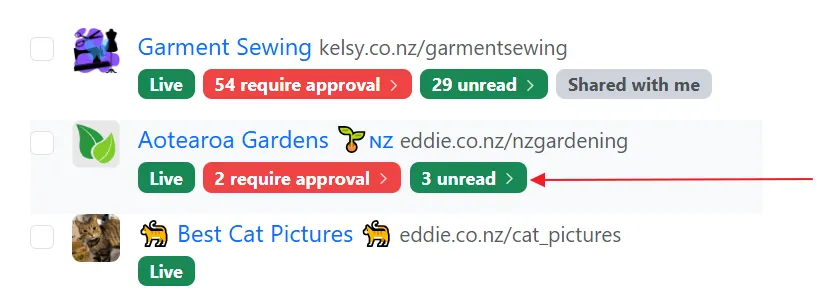
Section titled “What the count means”Each post starts unread when it is captured. On My Feeds, a green badge shows how many unread posts that feed has, for example 12 unread. Click the badge to open that feed on the Unread tab.
On the post itself, a small green dot sits next to the time. The dot means the post was still unread when the list loaded. After the post has been on screen for about a second, it is marked read and the dot fades out. It stays in the list. The next time you open the Unread tab, posts you have already seen are not included.
You can also sort My Feeds by Unread to put feeds with the most unread posts first.
Turn the count off or on
Section titled “Turn the count off or on”You can hide the unread count for some feeds and leave it on for others.
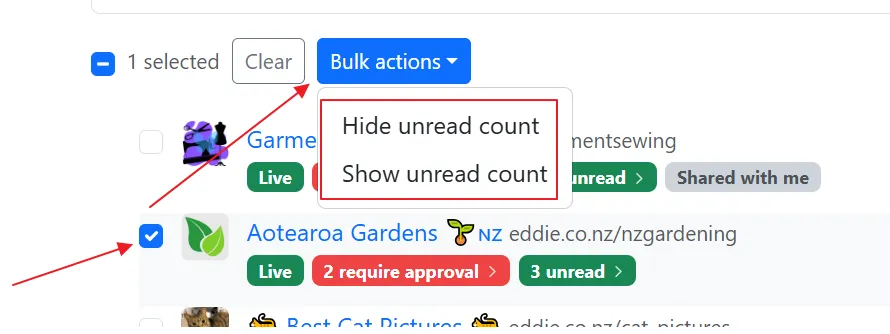
- Open My Feeds.
- Check the feeds you want to change. Use Select all to check every feed on the current page.
- Open Bulk actions.
- Choose Hide unread count or Show unread count.
Hide unread count removes the green badge from those feeds and marks their current unread posts as read. Newly captured posts are stored as “already read”, so the count does not start climbing again.
Show unread count puts the badge back. Posts captured after the change are treated as “unread” again.
You can also change one feed from its post list. Open the Unread tab, then Settings, and set the Unread count setting.